
Download PC Decrapifier – remove junk programs, clean PC, free PC cleanup tool, portable PC utility, Windows XP, Vista, 7
Overview
PC Decrapifier is a compact, freeware utility designed to streamline the process of removing unnecessary software from Windows-based systems. Specifically tailored for both brand-new and used PCs, the application targets pre-installed bloatware and unwanted programs that often hinder system performance and consume valuable storage space. By offering a straightforward solution to digital clutter, PC Decrapifier helps users reclaim system resources and improve overall responsiveness. The tool is particularly useful for individuals setting up a fresh machine or those seeking to optimize an older system burdened by unused applications.
Target users include tech-savvy individuals, IT professionals, and general PC users who want to maintain a clean and efficient computing environment without relying on complex or resource-heavy tools. The application’s focus on simplicity and portability makes it ideal for use across multiple machines, especially in environments where administrative access or software installation is restricted. While the developer, PC Decrapifier, did not provide additional background information, the tool’s long-standing presence in the system utilities space suggests a dedicated, community-supported project.
Real-world use cases include preparing a second-hand PC for a new owner, decluttering a corporate workstation, or enhancing performance on a legacy system running Windows XP, Vista, or 7. In the broader app ecosystem, PC Decrapifier fills a niche for lightweight, no-installation cleanup tools that prioritize accessibility and safety. Its ability to operate without leaving traces on the host system further strengthens its value in temporary or shared computing scenarios.
Key Features & Functionality
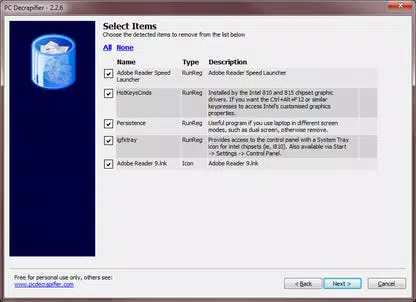
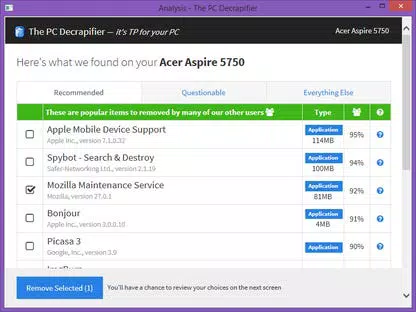
- Efficient Program Removal – PC Decrapifier scans the system for applications deemed unnecessary based on predefined criteria. Users receive a curated list of programs to remove, enabling bulk deletion with minimal effort. This feature is especially beneficial for eliminating trial software, bundled applications, and redundant utilities that consume disk space and background resources.
- Portable and Freeware – The application is fully portable, requiring no installation. It can be run directly from a USB drive or any folder, making it highly convenient for use on public or restricted machines. As a freeware tool, it is accessible to all users without cost, promoting broad adoption across personal and professional environments.
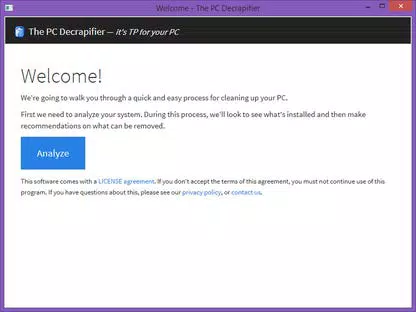
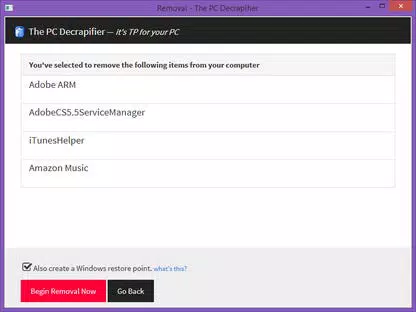
- Wizard-Based Interface – A step-by-step wizard guides users through the scanning and removal process. Clear prompts and intuitive navigation ensure that even novice users can perform cleanup tasks confidently. The interface avoids technical jargon, focusing on actionable choices and real-time feedback.
- Restore Point Creation – Before initiating any removals, the tool offers the option to create a system restore point. This safety feature allows users to revert changes if unexpected issues arise, reducing the risk of system instability and enhancing user confidence during cleanup operations.
For example, a user setting up a refurbished laptop can launch PC Decrapifier from a USB drive, scan for pre-installed trial software, and remove dozens of programs in minutes. The restore point ensures that if a critical system component is mistakenly removed, the system can be restored to a stable state. Similarly, a technician managing multiple machines can use the same portable tool across different systems without requiring administrative rights or software deployment.
Interface, UX & Performance
PC Decrapifier features a minimalistic, task-focused interface that prioritizes clarity and usability. The wizard-based layout ensures a linear, predictable user journey, with each step clearly labeled and logically ordered. Navigation is intuitive, requiring only basic mouse interactions and click-based decisions. The visual design is functional rather than decorative, aligning with the tool’s utility-focused purpose.
Performance is optimized for lightweight operation. With a file size of just 1.4 MB, the application loads quickly and consumes minimal system resources. Although the developer did not list formal performance metrics, the tool’s compact nature suggests efficient memory and CPU usage, making it suitable for older hardware running Windows XP, Vista, or 7. Responsiveness remains consistent across different device categories, including low-end systems and legacy machines.
Stability is a key strength. The application runs without crashes or unexpected behavior during standard cleanup tasks. The inclusion of a restore point feature further enhances reliability by mitigating risks associated with software removal. While no official updates have been released since 2015, the tool remains functional on supported operating systems, indicating a stable, maintenance-light design.
Platform Compatibility & Technical Requirements
PC Decrapifier is designed for the Windows platform and supports Windows XP, Vista, and 7. The software is distributed as a portable executable, meaning it does not require installation or administrative privileges to run. The file size is 1.4 MB, making it highly efficient for storage and transfer.
The developer did not specify minimum OS requirements beyond the listed versions. Compatibility with newer Windows versions, such as Windows 10 or 11, has not been confirmed. Users should exercise caution when attempting to run the tool on modern systems, as legacy applications may encounter compatibility issues or fail to function properly.
Pros and Cons
Pros
- Free to use with no licensing restrictions
- Portable – runs from USB or any folder without installation
- Simple, wizard-based interface suitable for beginners
- Includes system restore point creation for safety
- Lightweight with minimal system impact (1.4 MB)
Cons
- Latest version released in 2015; no recent updates
- Support limited to older Windows versions (XP, Vista, 7)
- Developer did not provide technical specifications or support channels
- Not compatible with newer operating systems
- No built-in backup or logging for removed applications
FAQ
Is PC Decrapifier safe to use?
Yes, the tool includes a restore point feature to allow system rollback if needed. However, users should carefully review the list of programs before removal to avoid uninstalling essential system components.
Can I use PC Decrapifier on Windows 10 or 11?
While not officially supported, some users have reported success on newer systems. However, compatibility is not guaranteed, and the tool may not function correctly on Windows 10 or 11 due to changes in system architecture.
Do I need admin rights to run PC Decrapifier?
No, the application is portable and does not require administrative privileges. It can be executed directly from a USB drive or local folder.
How often should I run PC Decrapifier?
It is recommended to use the tool when setting up a new or used PC, or when noticing performance degradation due to accumulated software. There is no need to run it frequently, as it removes only pre-installed or unnecessary applications.
Is PC Decrapifier available for Mac or Linux?
No, the application is designed exclusively for Windows platforms and is not available for Mac or Linux operating systems.
Final Thoughts
PC Decrapifier remains a reliable, no-frills solution for users seeking to remove junk programs from legacy Windows systems. Its portability, simplicity, and safety features make it a valuable tool for anyone managing older hardware or preparing PCs for reuse. While the lack of recent updates and limited OS support are notable drawbacks, the tool continues to serve its core purpose effectively on Windows XP, Vista, and 7.
For users maintaining vintage machines, performing system cleanups in restricted environments, or needing a lightweight, free utility, PC Decrapifier delivers real value. Its straightforward design and risk-mitigating features ensure a smooth experience even for non-technical users.
Download PC Decrapifier now


